 PreConstruct AI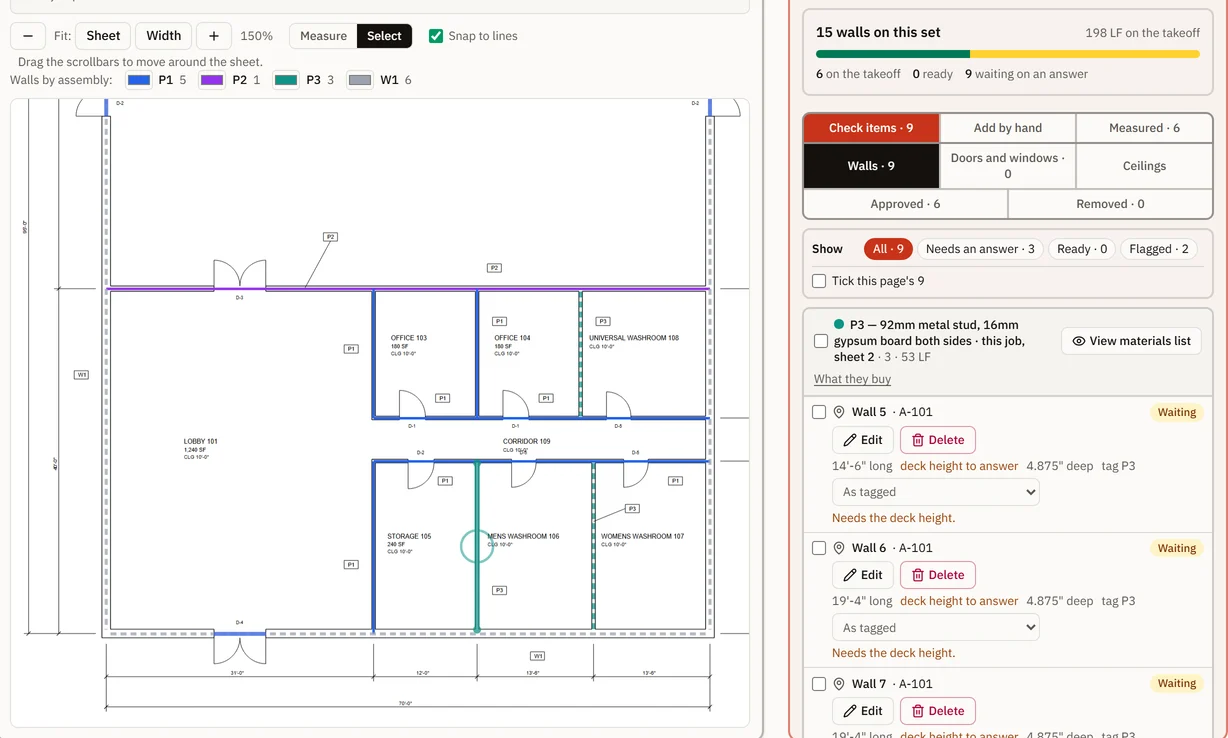
In-house, on drawings you can check
Many drywall subs send the takeoff out and get a list of quantities back. Run it in-house and your estimator keeps the drawings, the answers to the questions the drawings leave open, and the working behind every line. When the GC asks where 84 sheets of board came from, the answer is on the job, wall by wall.
Below is the whole job on our sample set, Riverbend Community Centre, which is fictional and made for showing the product. Its quantities come from the product’s own code, so they change if the code does. For what it takes off and what it costs, see drywall takeoff software built for subcontractors.
How the job runs
- Plans: upload the set as PDF and press Analyze blueprint, which reads every sheet’s text, schedules, legends and notes among them.
- Measure, step 1: confirm the scales.
- Measure, step 2: approve the types and assemblies.
- Measure, step 3: tick that you will check each wall, then press Start analysis.
- Measure, step 4: check and approve each wall and ceiling beside the drawing. Each wall you approve is added to the Takeoff.
- Review: counts read, Check before you price, and Project scope and notes.
- Takeoff: one line per material, each opening to its walls, and the export.
- Suppliers, Estimate and Proposal: prices, labour, markup and what the GC reads.
The drawing set
Plans takes PDF only, up to 250 MB a file. One bid is one drawing set of up to 75 sheets. A bigger set is read 75 sheets for each bid you hold, from the first sheet, and Finish reading in the project reads the rest once you hold more bids. See plans and what a bid covers.
Sheet numbers are read from the title blocks. A sheet with no number that can be read is left blank, never guessed. Scanned sheets are read for their text, but walls are suggested (a beta you check wall by wall) only on CAD drawings, from their line work. Full-size scanned sheets, 36 × 24 in, cannot be read on the live site at present. Riverbend is 14 sheets, and its floor plan is A-101.
Scales, confirmed sheet by sheet
Where a sheet prints one scale, it is read and offered; a sheet that prints several, or only NTS, gets none, and you set it. In Measure step 1 you confirm each one, or set or check it from a printed dimension (Set it from a dimension, Check it against a dimension). A scale read wrong can be changed, and a missed one added. Riverbend’s A-101 prints 3/16" = 1'-0".
Partition types, approved before any wall
Each line of the partition legend becomes a type holding what the line prints: stud, spacing, board, faces, insulation, rating and how high the wall runs. In Measure step 2 each type sits beside the legend line it came from, boxed on the drawing if you ask, and you approve it, edit it or leave it out of the bid. Start waits until every type is decided, and a wall only ever takes a type you approved.
A typical note such as “ALL INTERIOR WALLS TO BE TYPE P1 U.N.O.” is offered for the walls the plan does not tag, and you confirm it wall by wall. Riverbend’s legend prints 4 types:
| Mark | As the legend prints it | What the type holds |
|---|---|---|
| P1 | 92mm STEEL STUDS AT 406mm O.C. · 16mm TYPE X GYPSUM BOARD EACH SIDE · TO 6" ABOVE CEILING | 92mm metal stud at 16 in; 16mm Type X gypsum board, 4×8, both faces; 6 in above the ceiling |
| P2 | 152mm STEEL STUDS AT 406mm O.C. · ACOUSTIC BATT INSULATION · 16mm TYPE X GYPSUM BOARD EACH SIDE · 1 HR, STC 50 · TO U/S OF DECK | 152mm metal stud at 16 in; 16mm Type X gypsum board, 4×8, both faces; ACOUSTIC BATT INSULATION; to the deck |
| P3 | 92mm STEEL STUDS AT 406mm O.C. · 16mm MOISTURE RESISTANT GYPSUM BOARD EACH SIDE · TO U/S OF DECK | 92mm metal stud at 16 in; 16mm moisture-resistant gypsum board, 4×8, both faces; to the deck |
| W1 | 9mm FIBRE CEMENT PANEL ON GIRTS · AIR/VAPOUR BARRIER, SELF ADHERED · 76mm RIGID MINERAL WOOL INSULATION · 13mm EXTERIOR GYPSUM SHEATHING · 152mm STEEL STUDS AT 406mm O.C. · 16mm TYPE X GYPSUM BOARD | 152mm metal stud at 16 in; 16mm Type X gypsum board, 4×8, one face; MINERAL WOOL INSULATION; 13mm EXTERIOR GYPSUM SHEATHING; 9mm FIBRE CEMENT PANEL ON GIRTS (an extra material); AIR/VAPOUR BARRIER, SELF ADHERED (an extra material); height asked for |
W1 is the exterior wall. Decide whether its inside face of board and its steel studs are in your scope; on commercial work they often sit in the interiors package, and the specification and the bid form say which. Legends written as codes, such as “3H” for a stud and a board, are not read, so those types are made by hand. For what each column of a legend means, see how to read a partition schedule.
Walls: suggested (beta) or drawn, and each one checked
Before the analysis starts you tick a box saying you will check each wall against the drawing, then press Start analysis; it never starts on its own, and Stop ends it. Wall suggestions are a beta: they miss walls and mark things that are not walls. Approve walls one at a time, or a type’s ready walls together once you have looked at them on the drawing. Draw the walls it missed with Add by hand; Back to as detected undoes your changes to a wall.
Each wall’s height follows its type’s rule: to the ceiling, a set number of inches above it, or to the deck. A height the drawings do not give is asked for, never assumed. Riverbend’s notes give a 10 ft ceiling, so P1 walls stand 10 ft 6 in. P2 runs to the deck, and the deck height, 16 ft on the notes, is typed once for the sheet when it is asked for.
Doors and windows in a suggested wall (beta) are read with it, sized from the schedules by their marks, or by the drawn width and a height you type where no mark is printed, and you check them with the wall. Each opening comes off both faces of board and adds the type’s extra studs. A wall you draw takes its doors and windows from the schedules, or measured on the drawing.
Ceilings and bulkheads
Ceiling types come from the ceiling legend, for you to approve like the partition types. A grid ceiling buys main tees, cross tees, hangers, tile and wall angle; a gypsum ceiling buys its framing, board, tape, compound, primer and paint.
Ceilings are suggested with the walls (beta) where the ceiling plan tags a room with its type and height and the walls close the room. You check each one. An open plan, or a room the walls do not close, gets no suggestion: you are asked about it, and you draw that area.
Bulkhead faces are measured by hand. A ceiling’s Shape of this ceiling box adds coffer and cloud trim, in feet, to its edge trim. For the bulkheads, clouds and ceiling edges that go missing, see the checklist.
Quantities that open to their walls and sheets
The Takeoff tab has one line for each material in each division, summed across the walls that buy it and rounded up once. A line’s From N walls button lists each wall’s share, its type and its sheet, and Locate opens the drawing with that wall drawn on it. Counts read off the drawings keep the sheet they came from and the exact words printed there. Here is the arithmetic on two of Riverbend’s walls; the same set runs in the sample set, worked in your browser.
Example 1: Corridor 109, north partition (P1)
On A-101 the corridor’s north wall is 39 ft (11.9 m) long and stands 10 ft 6 in (3.2 m): the 10 ft ceiling plus the type’s 6 in. It has 3 doors: D-1 at 3 ft × 7 ft, D-1 at 3 ft × 7 ft, D-5 at 2 ft 10 in × 7 ft. As the legend makes it, P1 is 92mm metal stud, 16mm Type X gypsum board both sides. The legend prints no sheet size, so the board starts as 4 × 8, 32 SF a sheet; change it to the length you will stand. It buys:
| Material | Division | Working | Quantity |
|---|---|---|---|
| 92mm metal stud | 05 | 39 LF × 12 ÷ 16" = 30, + 1 = 31 + 3 openings × 4 = 43 × 10% waste = 47.3 → 48 | 48 EA |
| 92mm track | 05 | 39 LF × 2 = 78 × 10% waste = 85.8 → 86 | 86 LF (26.2 m) |
| 16mm Type X gypsum board, 4×8 | 09 | 695.3 SF net both faces × 10% waste ÷ 32 SF/sheet = 23.9 → 24 sheets | 24 SHT |
| Joint tape | 09 | 695.3 SF board ÷ 100 × 37 LF × 10% waste = 283 → 284 | 284 LF (86.6 m) |
| Joint compound | 09 | 695.3 SF board ÷ 100 × 1.4 gal × 10% waste = 10.71 → 11 | 11 GAL (41.6 L) |
| Latex primer | 09 | 695.3 SF × 1 ÷ 350 SF/gal × 5% waste = 2.09 → 3 | 3 GAL (11.4 L) |
| Eggshell latex | 09 | 695.3 SF × 2 ÷ 350 SF/gal × 5% waste = 4.17 → 5 | 5 GAL (18.9 L) |
Tape is 283.0007 before rounding; anything over a whole number rounds up, so it is 284 LF. If painting is let to another sub, exclude the primer and paint lines on the estimate with a reason such as “Paint by others” (see exclusions).
The job’s P1 total
Riverbend has 5 P1 walls, 128 ft in all. Summed across them, the Takeoff tab shows:
| Material | Division | Quantity |
|---|---|---|
| 92mm metal stud | 05 | 141 EA |
| 92mm track | 05 | 282 LF (86 m) |
| 16mm Type X gypsum board, 4×8 | 09 | 84 SHT |
| Eggshell latex | 09 | 15 GAL (56.8 L) |
| Joint compound | 09 | 38 GAL (144 L) |
| Joint tape | 09 | 995 LF (303 m) |
| Latex primer | 09 | 8 GAL (30.3 L) |
The studs show why the sum comes first: added up before rounding they come to 141; rounding each wall up first would give 144. The board line opens to its 5 walls:
- Lobby 101, east partition, at Storage 105: 14.4 sheets
- Lobby 101, east partition, at Office 103: 10.8 sheets
- Corridor 109, north partition: 23.9 sheets
- Corridor 109, south partition: 24 sheets
- Offices 103 and 104, between: 10.8 sheets
Added up: 84, rounded up once to 84 sheets. Each share includes the type’s waste.
Example 2: Multipurpose Hall 102, south partition (P2)
P2 is rated, has acoustic batt and runs to the deck. The hall’s south wall is 70 ft (21.3 m) long and 16 ft (4.88 m) high to the deck, with one D-3 pair of doors at 6 ft × 7 ft.
| Material | Division | Working | Quantity |
|---|---|---|---|
| 152mm metal stud | 05 | 70 LF × 12 ÷ 16" = 53, + 1 = 54 + 1 opening × 4 = 58 × 10% waste = 63.8 → 64 | 64 EA |
| 152mm track | 05 | 70 LF × 2 = 140 × 10% waste → 154 | 154 LF (46.9 m) |
| 16mm Type X gypsum board, 4×8 | 09 | 2156 SF net both faces × 10% waste ÷ 32 SF/sheet = 74.1 → 75 sheets | 75 SHT |
| ACOUSTIC BATT INSULATION | 07 | 1078 SF net one face × 5% waste = 1131.9 → 1132 | 1132 SF (105 m²) |
| Joint tape | 09 | 2156 SF board ÷ 100 × 37 LF × 10% waste = 877.5 → 878 | 878 LF (268 m) |
| Joint compound | 09 | 2156 SF board ÷ 100 × 1.4 gal × 10% waste = 33.20 → 34 | 34 GAL (129 L) |
| Latex primer | 09 | 2156 SF × 1 ÷ 350 SF/gal × 5% waste = 6.47 → 7 | 7 GAL (26.5 L) |
| Eggshell latex | 09 | 2156 SF × 2 ÷ 350 SF/gal × 5% waste = 12.94 → 13 | 13 GAL (49.2 L) |
- The batts are in square feet because the legend prints no package size. Give the type your package size and the line counts packages.
- The type’s name carries “1 HR”, and the legend line it came from, “1 HR, STC 50”, stays beside it. The listed design governs the board, fasteners, joints, the head of the wall and firestopping; you follow it and price it.
- A deflection track at the deck is not on the printed type. If your specification calls for one, add it to the type as an extra material counted per foot of wall.
- At 16 ft, one 16 ft sheet stood up, or 4 courses of 4 ft sheets, fits the height with no offcut across it.
Our post on the columns every takeoff line needs recommends a net list. PreConstruct AI puts the type’s waste into the quantity instead, and each wall’s own working, on its row in Measure, starts from the net area and prints the waste beside it. For every formula and starting rate behind these lines, see the arithmetic page. To try a wall of your own, use the drywall calculator or the metal stud calculator, and for the studs themselves see steel stud gauges and sizes.
Assumptions, and the questions the drawings leave open
- Heights come from the legend (“TO 6" ABOVE CEILING”, “TO U/S OF DECK”) and the room and deck heights the drawings give.
- Openings come off both faces of board, and each type sets its extra studs per opening (4 to start).
- Waste is set on the type for each material family and printed on the line. P1 as the legend makes it starts at 10 per cent for framing, 10 for board, 10 for tape and compound, and 5 for primer and paint.
- Board is figured by area, not laid out sheet by sheet. On a 10 ft 6 in wall, if you lay 3 courses of 4 ft sheets, or stand 12 ft sheets, 1 ft 6 in of every 12 ft, about 12.5 per cent, comes off the top before any opening. Standing 11 ft sheets, where your supplier stocks them, loses 6 in, about 4.5 per cent. Either way the type’s starting 10 per cent may not match, so set board waste to the job’s heights. Here is where a drywall waste factor comes from.
- Questions are asked once and kept: the deck height for each floor, the type of each untagged wall, and the room heights, door heights and ceiling types the drawings leave open. A deck worked out from a section is offered, never applied.
Check before you price, on Review, lists what does not add up where it changes the bid:
- a wall type tagged on the plans that no legend defines
- a typical note naming a type nobody defined
- a tag whose fire rating does not match its type’s legend line
- a room given two ceiling heights
- a schedule size that reads two ways
- a door on the schedule that sits in no wall
It is a help, not a guarantee.
Exclusions and scope
Review’s Project scope and notes holds your team’s own notes and special requests for the job, each tied to one trade if you like. They are typed by people, stay on the job and do not print on the proposal.
On the Estimate, Exclude from bid takes a line out with a reason, such as “Paint by others”. It stays measured on the takeoff, and Put back in the bid reverses it. The excluded line then leaves the proposal entirely, with no word to the GC, so write the exclusion in the proposal’s Notes as well.
Your standing “What your bids include, by default” and “What they exclude, by default”, in Settings → Company, print on every proposal as What this includes and What this excludes. Before you write them, work through the scope questions to settle before you price.
Review, approval and addenda
Nothing reaches the takeoff unless you approved it: walls and ceilings in Measure, counts read on Review. When an addendum comes in, upload it on Plans as a revision of the set. Sheets are matched by number, only the changed sheets are read and charged, and takeoff rows from a changed sheet are badged Sheet changed until you check them. Here is how to read an addendum before you bid.
Export
The Takeoff tab downloads as an XLSX or CSV file, grouped by division. Its columns:
| Column | What it holds |
|---|---|
| Division | The two-digit division the line is filed under |
| Description | The material, as the type names it |
| Quantity, Unit | The figure to buy, the type's waste included |
| Metric quantity, Metric unit | Added when the company works in metric or both |
| Source | How the line was made |
| Source sheet, Source text | For lines read from the drawings: the sheet and the exact words |
| Covered by quote | The sub quote that covers the line, if one does |
| Flagged, Flag reason | Anything marked for a second look |
| Notes | For a measured line, each wall's share and the sum before rounding |
A measured line’s Notes read like “5 walls: … = 84 → 84 SHT”: each wall’s share, waste included, and the sum before rounding. The net area is in each wall’s own working, on its row in Measure. Measured lines carry no sheet in the file; the Takeoff tab shows it under From N walls.
Every export carries a line at the top telling you to verify the quantities before you use them in a bid or contract. The Estimate downloads the same two ways, adding unit cost, markup, total, what priced each line and why, and division subtotals; margin is in the file for owners and managers only. Settings → Export your data bundles your projects into one .zip file.
After the takeoff
The approved quantities carry into the Estimate, where your own prices, labour and markup apply before the proposal is made, and on the Team and Business plans into Suppliers, where each supplier’s quote starts from the takeoff. Here is how takeoff quantities move into supplier quotes and the estimate.
What it does not do
- Wall and ceiling suggestions are a beta. They miss things and mark things that are not there, so you check each one and draw the rest.
- It reads text; it does not count symbols.
- It publishes no accuracy figure. Every line shows its working so you can check it.
- Scanned sheets get no wall suggestions (beta): you draw those walls and check them like the rest.
- Legends written as codes are not read.
- Board is figured by area, not laid out sheet by sheet.
- It does not choose a listed fire-rated design, a stud gauge or a stud size. Those come from the drawings and the specification.
- It makes no purchase orders.
Questions estimators ask
- Can I see where each quantity came from?
- Yes. On the Takeoff tab every line opens to the walls it came from, with each wall's share, type and sheet, and Locate shows each one on the drawing. In the export, lines read from the drawings carry their sheet and exact words, and measured lines carry each wall's share in Notes.
- What goes into the export?
- An XLSX or CSV file, one row a line and grouped by division: description, quantity and unit, its source, the sheet and exact words for lines read from the drawings, any sub quote that covers it, flags, and Notes, plus metric columns if you work in metric or both. The quantity includes the type's waste.
- What happens when an addendum comes in?
- Upload it as a revision of the set. Sheets are matched by number, only the changed sheets are read and charged, and takeoff rows from a changed sheet are marked Sheet changed until you check them.
- Where does waste go, and does it lay out sheets?
- On the wall type, for each material family. It is added before rounding and printed on the line. Board is figured by area and not laid out sheet by sheet, so set board waste to the job's wall heights. A new project's estimate also starts with a waste factor of its own, so keep one or the other.
- Do I still check every wall?
- Yes. Wall suggestions are a beta: they miss walls and mark things that are not walls. You confirm each one beside the drawing and draw the rest, and scanned sheets get no suggestions at all.
- Is a rated wall handled differently?
- The rating the legend line prints is kept on the type, and Check before you price flags a tag whose rating does not match its type's legend line. The listed design is yours to follow and price.