 PreConstruct AI
See it work
Our sample set, one wall, and the work beside every number
Watch it on the sample set, then run the arithmetic yourself. No account for either. The set below is the sample a new account can open, and the materials are worked out here, in your browser, by the same code the product uses.
Try it on a set you are bidding. Your first bid is free, and no card is needed.
Start your first bid freeHow to
Add your prices
The takeoff gives you quantities. Your own prices turn them into an estimate, and they are typed once, in Settings.
1. Settings → Material prices
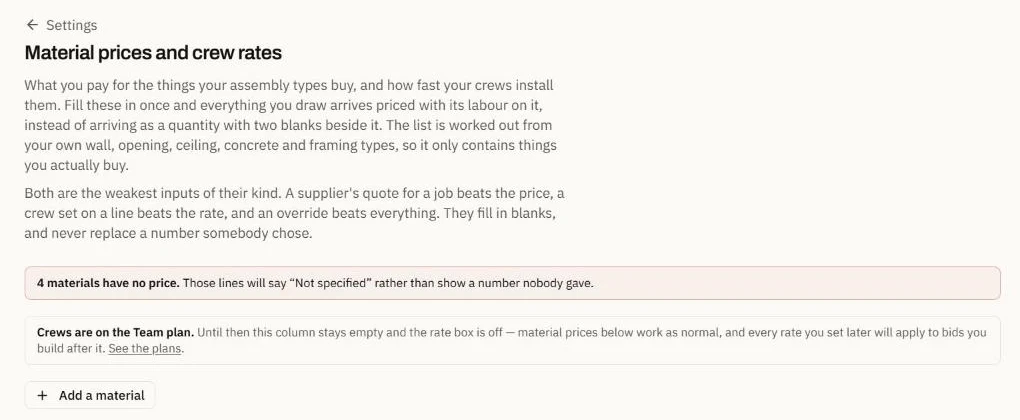
The list is worked out from your own wall, door and ceiling types, so it holds only what you buy. A line with no price says “Not specified” on the estimate. Nothing is filled in for you.
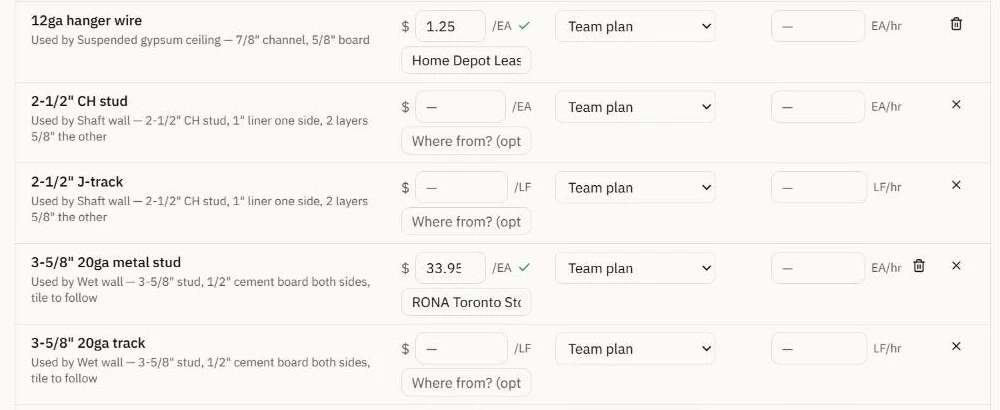
Supplier quotes, labour, markup and the proposal come after that: see how quantities become a priced estimate.
Now check the numbers
The same four steps, running in your browser
A video can be edited. This cannot — it is the product’s own code, working the quantities out as you read.
It reads the set for what makes a quantity
This is the sample set a new account can open: a 14-sheet community centre. It reads every sheet, the schedules, the legend and the notes among them, and keeps what a takeoff needs. These came off its floor plan.
- Sheets read
- 14
- Scale on the plan
- 3/16" = 1'-0"
- Wall types in the legend
- 4
- Doors on the plan
- 11
You see the cost before anything runs, and nothing is spent without you pressing the button. A scale it read wrong, you change.
One wall here; for every step from the scales to the export, read the whole commercial drywall takeoff on this sample set.
The only invented numbers on this page are the example unit prices in the last step, and it says so there. Everything else is either measured or computed — the formulas are published on Check our math.